Calendar > Setting additional details for an Event > Setting a Repeating Event
 Setting a Repeating Event
Some Events repeat at regular intervals—firm administration meetings and administrative reports, for example. If you set such an Event to recur, you need to add it only once in the Calendar.
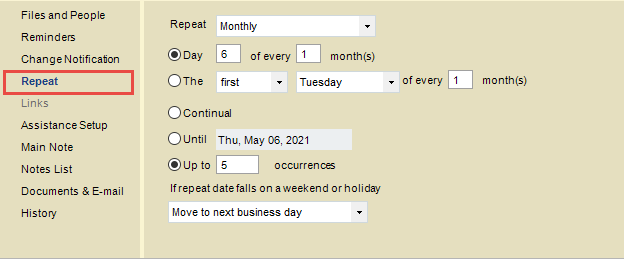
Choose Repeat on the navigation list in the Event Details dialog.
This topic covers:
 |
Note: A Linked Event cannot be set to Repeat. |
Repeat Frequency
To set the frequency of the Repeating Event, select "No Repeat", "Daily", "Monthly", "Quarterly", "Weekly", or "Yearly" in the Repeat list box. The subsequent choices depend on which frequency you selected.
-
If "No Repeat", no further choices are necessary.
-
If "Daily", select the first option and enter the day interval in the text box (e.g. every 3 days). Or, select the Every Weekday option.
-
If "Monthly", select the first option, enter the day of the month in the first box, and enter the month interval in the second box (e.g. day 10 of every 2 months).
Or, select the second option, select the week interval in the first list box, select the day of the week in the second list box, and enter the month interval in the third box (e.g. the third Friday of every 2 months).
-
If "Quarterly", no further interval choices are necessary.
-
If "Weekly", enter the week interval in the first box, and select one or more of the day checkboxes (e.g. every 2 weeks on Tuesday and Friday).
-
If "Yearly", select the first option, select the month in the first list box, and enter the day of the month in the second box (e.g. every July 15).
Or, select the second option, select the week interval in the first list box, select the day of the week in the second list box, and select the month in the third list box (e.g. the third Friday of July).
The default choices are set according to the date of the Event. If you change the date, you get different corresponding choices for repeat intervals.
 |
Tip: To Do's are carried forward automatically each day until you mark them Done, so it should rarely be necessary to create a To Do that repeats Daily. |
Duration
For a Repeating Event, you must next specify when it should stop appearing in your Calendar. It is a good idea to limit the number of Events, because Events that repeat indefinitely can clutter up your Calendar.
To set the duration, select one of the three options:
-
To repeat indefinitely, select the Continual option.
-
To repeat until a specific date, select the Until option and enter an end date in the adjoining box.
-
To repeat a specific number of times, select the Up To option, and enter the number of occurrences in the adjoining box.
Weekends and Holidays
Finally, you can specify how to automatically reschedule an occurrence of a Repeating Event if it falls on a weekend or an observed holiday. In the list box, select whether you want to schedule the occurrence on that day anyway, move it to the previous or the next business day, or cancel that occurrence of the Event.
Related Topics